 By
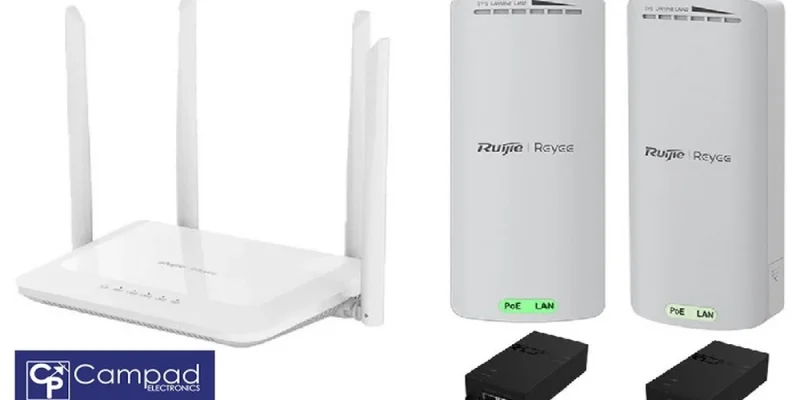
TL;DR: Yes, Starlink can be extended wirelessly to another building using a Wi-Fi bridging kit instead of trenching physical ethernet cables. Campad Electronics’ Wi-Fi Bridging Kit Up To 500m Range ($259.99 AUD) uses a Ruijie Reyee RG-EST100-E wireless bridge pair to connect buildings up to 500 metres apart, then distributes full Wi-Fi 5 coverage through a Ruijie Reyee RG-EW1200 mesh router. It works with an existing Starlink or NBN connection.
Get a quote for trenching cable between your house and a shed, granny flat or detached office and you’ll quickly see the problem. Digging a trench 100, 200 or 300 metres across a property, protecting the cable from rocks and tree roots and potentially hiring an electrician can cost thousands of dollars and take weeks to arrange. For many rural and semi-rural properties across Australia, that timeline and budget simply aren’t realistic.
When it’s not possible or not cost-effective, to connect a second location with physical ethernet cables, wireless bridging is the practical alternative. The technology has reached a point where a stable, strong connection can travel across open ground without a single metre of buried cable. This matters most for anyone who wants to connect wireless devices in another building without the expense and disruption of civil works.
Campad Electronics’ Wi-Fi Bridging Kit Up To 500m Range is purpose-built for exactly this job. It pairs a long-range wireless bridge with a proper mesh router, so the second building gets genuine whole-space Wi-Fi coverage rather than a single weak signal near a window. This guide explains how wireless bridging kits work, what’s inside the Campad Electronics kit and how to work out whether this setup suits your property.
Can Starlink be extended wirelessly to another building?
Yes. A Starlink Wi-Fi extender setup, built around a wireless bridging kit, carries your existing Starlink or NBN connection from a main house to a second structure without any cable running between the two. The kit doesn’t replace or duplicate your Starlink system, it simply relays the connection you already have.
This matters for anyone wanting to connect multiple buildings or locations using Starlink on one property. Rather than buying a separate satellite service for each structure, a single Starlink or NBN connection at the main building can be shared across a shed, farm building, granny flat or home office using one bridging kit per additional structure.
How does a Wi-Fi bridging kit work?
A Wi-Fi bridging kit creates a wireless, point-to-point link between two locations, standing in for the physical network cable you’d otherwise need to trench or string overhead. Two bridge units talk directly to each other across open air, provided there’s a reasonably clear line of sight between them.
The Campad Electronics kit uses a pair of Ruijie Reyee RG-EST100-E wireless bridges, operating on the 2.4GHz dual-stream band. One bridge connects to your existing Starlink or NBN router at the main building. The second bridge mounts at the remote building and picks up that signal wirelessly, at distances of up to 500 metres under good conditions.
Here’s the setup process in practice:
- Connect the first wireless bridge to your existing Starlink or NBN router using one of the included PoE adaptors.
- Mount the second bridge at the remote building, with a clear line of sight back to the first bridge.
- Connect the second bridge to the included RG-EW1200 mesh router.
- The RG-EW1200 mesh router then broadcasts dual-band Wi-Fi 5 coverage throughout the second building.
Campad Electronics designed the kit around user-friendly interfaces, so no networking expertise is required. That matters if you’re planning a weekend DIY install rather than booking a technician.
Why does the kit include a mesh router, not just a wireless bridge?
This distinction is worth understanding before buying. A wireless bridge alone only solves half the problem: getting a signal to a second building. It doesn’t spread that signal throughout the building once it arrives.
That’s why the Campad Electronics kit pairs the RG-EST100-E bridge pair with a Ruijie Reyee RG-EW1200 dual-band Wi-Fi 5 mesh router. The receiving bridge hands the incoming connection off to the RG-EW1200, which distributes proper dual-band Wi-Fi across the whole space. For a small single-room shed, this might barely register. For a granny flat, workshop or open-plan home office, it’s the difference between usable coverage everywhere and a weak signal confined to one corner.
Choose this kit if you need reliable Wi-Fi across an entire secondary structure, not just at a single device sitting right next to the receiver.
What’s included in the Wi-Fi Bridging Kit Up To 500m Range?
The Wi-Fi Bridging Kit Up To 500m Range arrives as a complete package, so there’s no need to source extra networking hardware separately. It includes:
- 1 × Ruijie Reyee RG-EW1200 Dual-Band Wi-Fi Mesh Router
- 1 × pair of Ruijie Reyee RG-EST100-E 2.4GHz dual-stream 500m wireless bridges
- 1 × pair of PoE adaptors
- 1 × CAT5e outdoor UV-stabilised pre-made patch cable, 10m
- 1 × CAT5e network patch lead (RJ45), 1m
The PoE adaptors let each bridge run cleanly off a single network cable, simplifying power arrangements at both ends. The outdoor-rated, UV-stabilised CAT5e cable is included for the short run typically needed to connect an outdoor-mounted bridge to indoor equipment and it’s built to handle Australian sun and weather exposure.
Note that the Starlink or NBN system itself is not included in this kit. You’ll need an active Starlink or NBN connection already running at your main building before adding the bridging kit to extend it outward.
How do you extend Starlink Wi-Fi to a shed, garage or outbuilding?
Sheds, garages and detached outbuildings are among the most common use cases for this kit, since they often sit just far enough from the house to make running cable impractical but close enough to fall well within a 500-metre wireless range.
The process follows the same four steps outlined above: mount one bridge near your existing Starlink or NBN router, mount the second bridge at the outbuilding with a clear line of sight back to the first, connect that second bridge to the included mesh router and let the router distribute coverage inside. For a workshop that needs reliable internet for tools, security systems or entertainment, this setup typically delivers far more consistent coverage than relying on a single router’s signal bleeding through external walls.
How do you extend Starlink range between buildings up to 400m away without cabling?
For a distance of around 400 metres, which sits comfortably within the kit’s rated range of up to 500 metres, the setup process is the same as for shorter distances, though line of sight becomes more important the further apart your buildings are. Trees, hills or other structures along the path can reduce effective range at greater distances, so it’s worth checking for a clear sightline between prospective mounting points before committing to a location.
Mounting height can help here. Eaves, poles or roof lines that lift each bridge above ground-level obstructions often make the difference between a reliable 400-metre link and a patchy one. If your two buildings have a reasonably open line of sight at that distance, this kit is typically far more cost-effective than trenching cable across the same span.
Extending Starlink to multiple buildings or locations using one connection
If you need to connect more than one outbuilding say, a shed and a separate granny flat, you’ll use a separate bridging kit for each additional structure, with each remote bridge linking back to the main building’s existing Starlink or NBN connection. This approach lets a single Starlink or NBN service cover an entire multi-building property without purchasing additional satellite or internet plans for each structure.
Common scenarios for extending Starlink to other buildings include:
- Granny flats and guest houses that need their own independent Wi-Fi coverage
- Home offices and studios set apart from the main house
- Farm buildings and outbuildings spread across larger blocks
- Multi-building sites that need seamless connectivity between structures
What affects the maximum range of the wireless bridge?
The RG-EST100-E bridge pair is rated for a maximum range of up to 500 metres, but that figure depends on real-world conditions. Line of sight between the two bridge units matters most. Trees, hills, sheds or other structures sitting between the two buildings can reduce effective range and local interference and terrain also play a role.
Choose this kit if your two buildings have a reasonably open sightline between them. If there are major obstructions along the path, it’s worth assessing mounting height options before installation to maximise line of sight.
How much does the Wi-Fi Bridging Kit cost and how is it shipped?
The Wi-Fi Bridging Kit Up To 500m Range is priced at $259.99 AUD, inclusive of GST. Campad Electronics issues a tax invoice with every order.
Domestic shipping within Australia costs $9.99, with delivery typically taking up to 14 working days, though most orders arrive sooner.
Frequently asked questions
Can Starlink Wi-Fi be extended wirelessly to another building?
Yes. A wireless bridging kit, such as the Campad Electronics Wi-Fi Bridging Kit Up To 500m Range, relays an existing Starlink or NBN connection to a second building using a point-to-point wireless bridge pair, avoiding the need for buried ethernet cable.
How far can the Wi-Fi Bridging Kit transmit a signal?
The Ruijie Reyee RG-EST100-E wireless bridge pair is rated for a maximum range of up to 500 metres. This figure assumes a clear line of sight between the two bridge units; obstacles like trees, buildings or hilly terrain can reduce the effective range.
Does this kit include a Starlink dish or NBN modem?
No. The Wi-Fi Bridging Kit extends an existing Starlink or NBN connection; it does not include the Starlink system itself. An active Starlink or NBN service at the main building is required before installing this kit.
Do I need networking experience to install the kit?
No. Campad Electronics designed the kit with user-friendly interfaces and a simple installation process, so no professional networking expertise is required. Setup follows four basic steps: connecting the first bridge to your router, mounting the second bridge at the remote building, connecting it to the mesh router and confirming coverage.
What’s the difference between the wireless bridge and the mesh router in this kit?
The RG-EST100-E wireless bridge pair handles the long-distance, point-to-point link between the two buildings. The RG-EW1200 mesh router then takes that incoming connection and distributes proper dual-band Wi-Fi 5 coverage throughout the second building, rather than leaving a single weak signal point.
Can I use this kit to connect multiple buildings using one Starlink connection?
Yes. Each additional building needs its own bridging kit, with the remote bridge in each kit linking back to the main building’s existing Starlink or NBN connection.
How much does the Wi-Fi Bridging Kit cost and what’s the delivery time?
The kit costs $259.99 AUD, including GST. Domestic shipping within Australia is $9.99, with delivery taking up to 14 working days, though most orders arrive sooner.
Getting your second building online
Trenching cable across a property is expensive, disruptive and often unnecessary when a wireless bridge pair can do the same job in a weekend. The Campad Electronics Wi-Fi Bridging Kit combines a 500-metre wireless bridge pair with a proper mesh router, so your shed, granny flat, farm building or home office gets genuine coverage rather than just a single connected point near the door.
If your second building sits within range and you have a workable line of sight, this kit offers a practical way to extend the Starlink or NBN connection you already have to multiple buildings on your property. Visit Campad Electronics to check current stock and place an order.








Comments